How to Register and Pay your Membership:
1. Click on the green button below and it will take you to Rugby Xplorer site (or you can download the rugby Xplorer app)
2. Login to your account OR if you are new to rugby create an account
3. Click “Register”
4. Click on the “Find a club” option
5. Search “Harlequins” and select “Harlequins Junior Rugby Club”
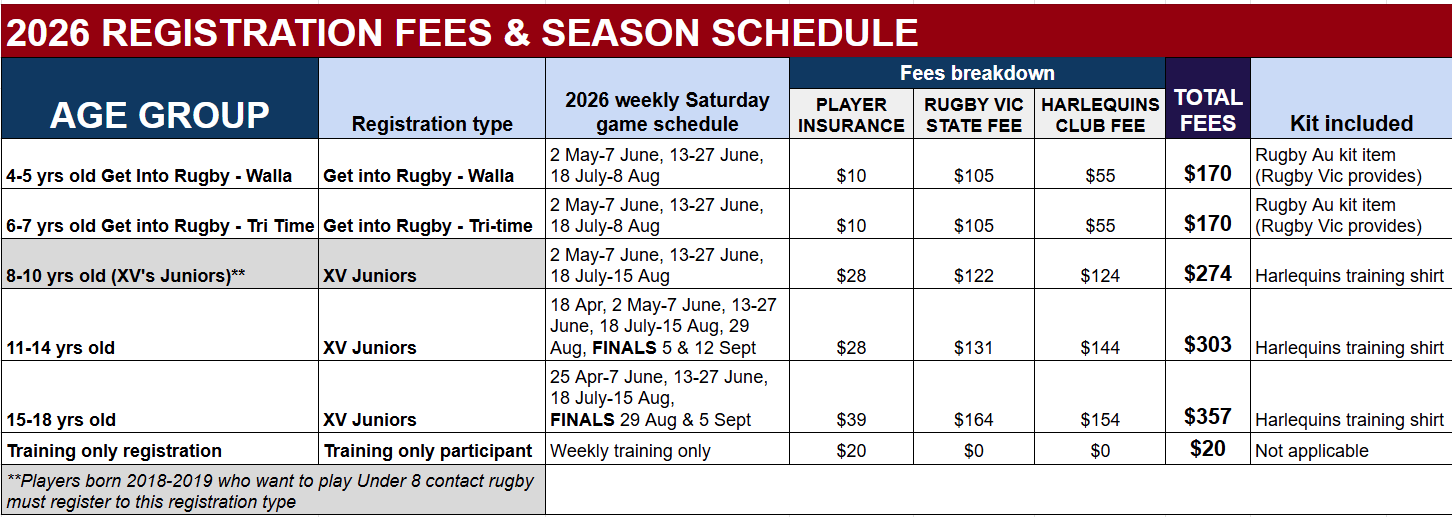
6. Select registration type: “Player” for “Season” or “Training only participant” for “Season” (Note: If you select training, you will need to upgrade to “season” before playing)
7. Select “XV’s Juniors” for Under 8 – 18 participants, “Get into Rugby – Walla” for Under 4-5 participants and “Get into Rugby – Tri-time” for Under 6-7 participants
8. Follow the prompts to complete registration and pay fees. You will receive a receipt via email which you can show our merchandise team to collect your club kit.
You can also download the Rugby Xplorer app and register through the app.